 Deadbolt
Guide
How to block Instagram
on iPhone.
Instagram is engineered to keep you there — Reels autoplay, the feed never ends, and 'just checking one thing' becomes forty minutes. Here are two ways to shut it off, from Apple’s built-in limits to a block that actually holds.

You didn’t open Instagram for 40 minutes. You opened it to check one notification — then a Reel played, then another, and the afternoon was gone. Deadbolt breaks that loop by making the app genuinely unavailable, not just 'limited.'
Option 1 — Apple’s built-in Screen Time
Free, already on your iPhone, and fine for a soft limit. Here’s the fastest path:
Open Settings → Screen Time.
Tap App Limits → Add Limit.
Choose Social (or search for Instagram specifically) and tap Next.
Set a daily time limit and tap Add. Instagram now nudges you when you hit it.
The catch: Screen Time limits are one tap to ignore — "Ignore Limit → Ignore for Today" — so they rarely hold once the craving hits. That’s the whole reason dedicated blockers exist.
Option 2 — Deadbolt (the one that holds)
When "ignore for today" is too easy, bolt Instagram shut for real:
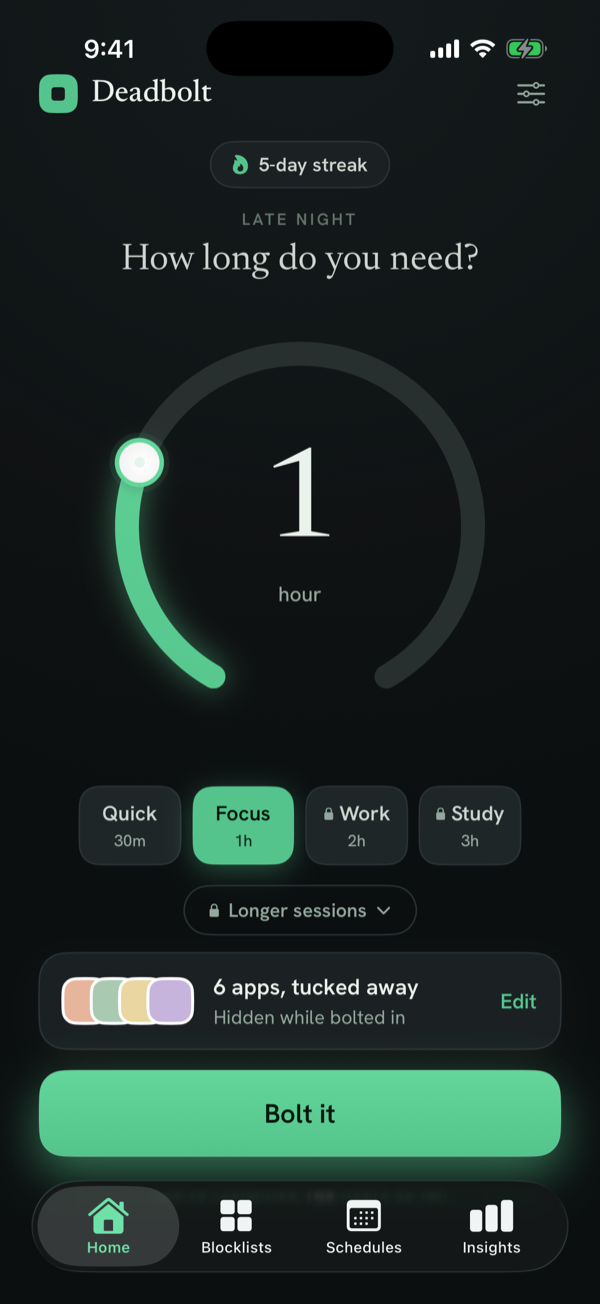
Open Deadbolt and tap Edit on the apps card.
Select Instagram (add Reels or all of Social while you’re there).
Spin the dial to how long you want it gone, then tap Bolt it.
For nights and work hours, add a daily schedule so Instagram locks itself — even when Deadbolt is closed.
Turn on Strict Mode if you tend to cave; now the only early exit is a cooldown or 200 steps.
Instagram blocking — FAQ
Can I block just Instagram Reels?
You block the Instagram app as a whole with Screen Time–based tools like Deadbolt. Reels lives inside the app, so blocking Instagram blocks Reels too. If Reels is your weak spot, blocking the whole app during your danger hours is the reliable fix.
Will I still get Instagram DMs and notifications?
While a block is active the app won’t open, so you won’t be pulled into the feed. You can still lift a block any time (in Strict Mode, after a short cooldown) if you genuinely need to reply.
Can Deadbolt block Instagram automatically at night?
Yes. Set a recurring daily schedule (say 10pm–7am) and Deadbolt locks Instagram every night on its own, even if you never open Deadbolt.
Does it block the Instagram website too?
Deadbolt blocks the Instagram app via Apple’s Screen Time. To stop web access, also add a website limit in Screen Time or block Safari during your focus window.
Is blocking Instagram free?
Yes — you can bolt Instagram shut for free (up to 15 minutes, twice a day). Longer sessions, Strict Mode, daily schedules and unlimited blocklists are part of Deadbolt Pro ($4.99/mo or $29.99/yr).
Block Instagram for real — tonight.
Free to start. Bolt your first distraction in under a minute.