 Deadbolt
Guide
How to block YouTube
on iPhone.
Autoplay and Shorts turn 'one video' into an hour, usually at midnight. Here’s how to block YouTube on your iPhone — Apple’s built-in limits, and a block that autoplay can’t talk you out of.

It’s late, you open YouTube for one clip, and autoplay quietly loads the next, and the next. Deadbolt ends the rabbit hole before it starts — bolt YouTube shut, or schedule it to lock every night on its own.
Option 1 — Apple’s built-in Screen Time
Free, already on your iPhone, and fine for a soft limit. Here’s the fastest path:
Open Settings → Screen Time.
Tap App Limits → Add Limit.
Choose Entertainment or search for YouTube, then tap Next.
Set a daily limit and tap Add.
The catch: Screen Time limits are one tap to ignore — "Ignore Limit → Ignore for Today" — so they rarely hold once the craving hits. That’s the whole reason dedicated blockers exist.
Option 2 — Deadbolt (the one that holds)
When "ignore for today" is too easy, bolt YouTube shut for real:
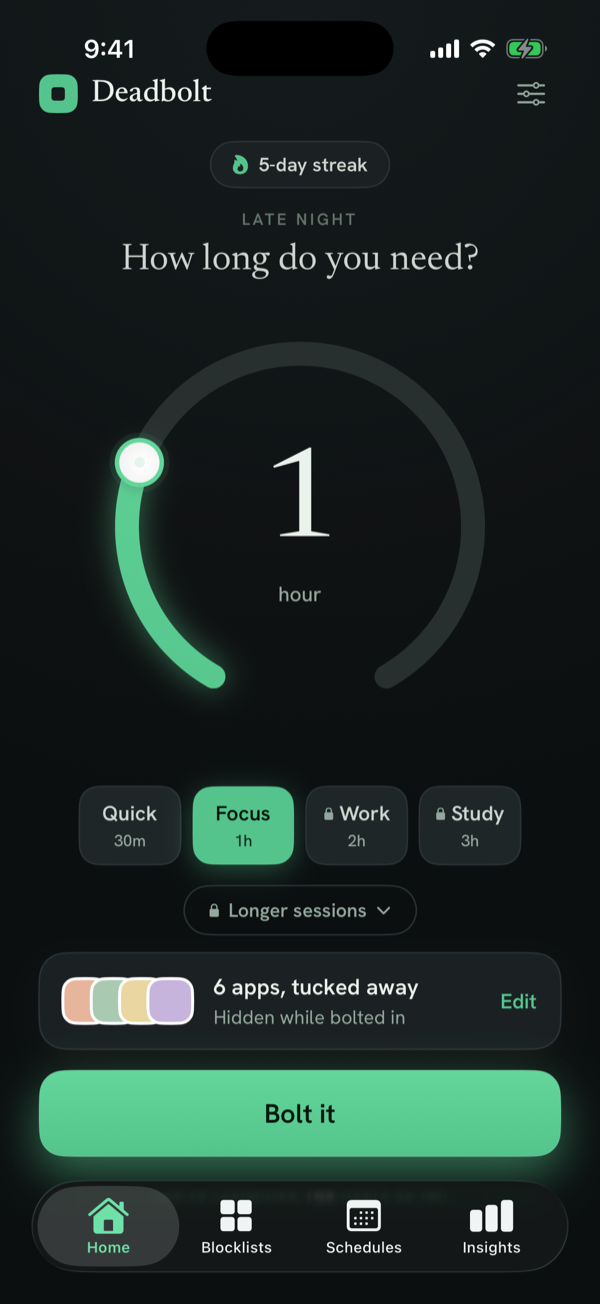
Open Deadbolt and tap Edit on the apps card.
Select YouTube (add it to a "Deep Work" blocklist for one-tap arming).
Pick a duration and tap Bolt it — no more "one more video."
Add a daily schedule for late nights so YouTube locks itself at bedtime.
Enable Strict Mode so autoplay can’t lure you back mid-session.
YouTube blocking — FAQ
How do I stop watching YouTube Shorts and autoplay?
Shorts and autoplay are designed to chain videos together. Blocking the YouTube app during your focus or wind-down hours removes the rabbit hole entirely — Deadbolt bolts it shut for a set time or on a schedule.
Can I block YouTube only at night?
Yes. A recurring overnight schedule (e.g. 11pm–7am) locks YouTube every night automatically, so "one more video" at midnight isn’t an option.
Can I block YouTube during study sessions?
Create a strict daily schedule for your study block, or bolt YouTube manually before you start. In Strict Mode you can’t quit early without a cooldown or a walk.
Does it block the YouTube website?
Deadbolt blocks the YouTube app through Apple’s Screen Time. For web access, add a Safari website limit in Screen Time during the same window.
Is it free?
Yes — bolt YouTube for free (up to 15 minutes, twice a day). Longer sessions, Strict Mode, daily schedules and unlimited blocklists come with Deadbolt Pro ($4.99/mo or $29.99/yr).
Block YouTube for real — tonight.
Free to start. Bolt your first distraction in under a minute.