 Deadbolt
Guide
Lock your apps every night.
Automatically.
Set it once. Your chosen apps lock at bedtime and open in the morning, even when Deadbolt is closed.
Late at night is when “five more minutes” turns into an hour. Deciding at 1 AM doesn’t work. Deciding once, in daylight, does.
Bedtime lock
Three taps,
every night after.
Tap "Bedtime lock" on Home
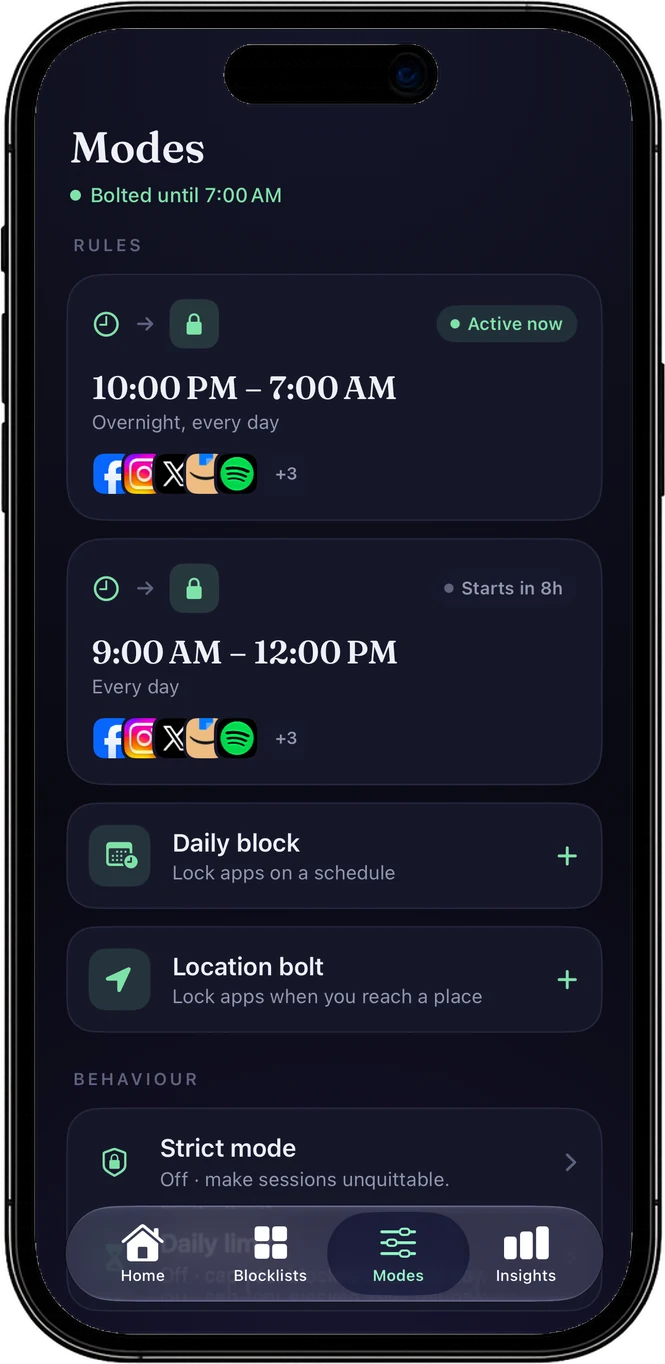
Pick some apps on Deadbolt’s Home screen and the row "Bedtime lock · Every night, 10 PM–7 AM" appears under them.
Choose the apps and the hours
Keep 10 PM to 7 AM or set your own. Each daily block has its own apps, so night can lock different apps than work hours.
Go to bed
The apps lock at the start time and open at the end, every night, whether Deadbolt is open or not.
Locking apps at night: FAQ
How do I lock apps at night automatically on iPhone?
Use a scheduled block. In Deadbolt, tap "Bedtime lock" on Home, choose the apps and the hours (10 PM to 7 AM by default), and they lock every night by themselves. iPhone’s own Downtime can do a version of this, but its block screen lets you ignore the limit (with your own passcode, if you set one).
Does it work when Deadbolt is closed?
Yes. The schedule is handed to iOS’s Screen Time system, so it starts and ends on time even when Deadbolt isn’t running.
Is the Bedtime lock free?
Yes. One daily block is free, and the Bedtime lock is it. Deadbolt Pro adds unlimited daily blocks (mornings, work hours) and strict daily blocks that can’t be ended early.
Can I open an app if I really need it at night?
In a normal daily block you can turn it off. A strict daily block (Pro) can’t be ended early, so leave anything you might need at night, like Phone or Messages, off its list.
How do I know it worked?
The first time you open Deadbolt the next morning after a night it held, it says "Good morning" and that your apps were locked all night.
Related: How to stop doomscrolling · An app blocker you can’t just switch off
Tonight, the apps go to bed first.
Free to start. Bolt your first distraction in under a minute.